A workflow taught by Adobe Certified Instructors at Adobe Video World.
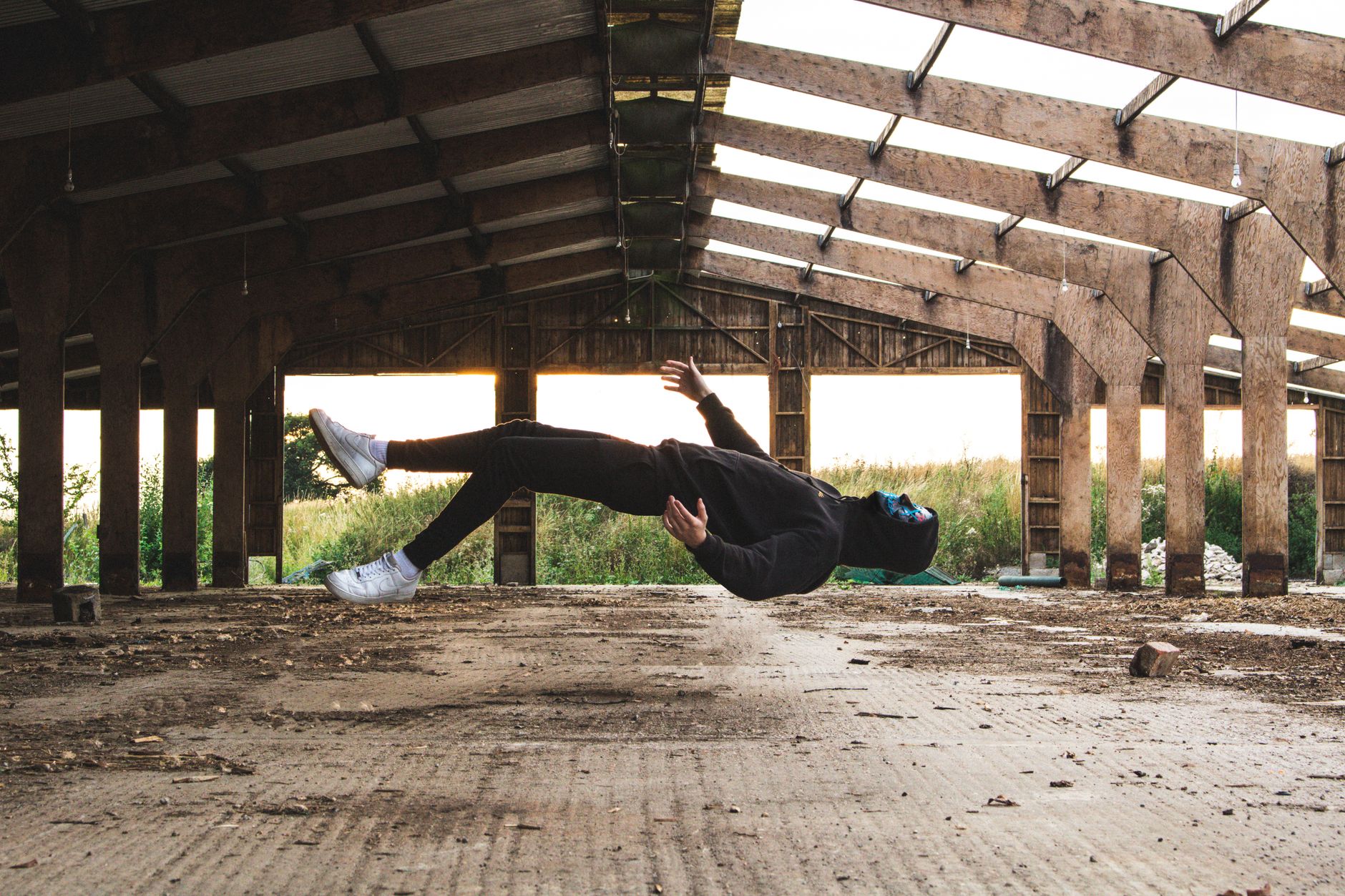
The levitation effect makes a person or object appear to float in mid-air, a magical visual that’s achieved by hiding a real support and removing it in post. With a clean plate and careful masking, you can make almost anything levitate. This guide covers creating a convincing floating effect in video.

How Levitation Works
The levitation effect supports the subject with something real — a stool, a stand, or a rig — then removes that support in post, leaving the subject floating. The trick is filming a clean plate so you can patch out the support cleanly.
It’s the same clean-plate principle behind invisibility, applied to erasing a support rather than a person. By hiding the prop holding the subject up, then painting it out with the empty background, you create the illusion of floating without any physical effect.

Support the Subject
Plan how to hold the subject up. A person can lie or pose on a sturdy support like a stool, table, or stack of boxes, while an object can rest on a stand, fishing line, or rig, positioned so the support is easy to remove later.
Choosing a support that’s stable and as hidden as possible simplifies the removal. Positioning it under or behind the subject, where the clean plate can easily patch over it, sets up a much easier composite than a support sprawled across the frame.

Lock the Camera and Film
A static camera is essential, as always. Mount on a tripod, film the subject posed on the support, then remove the support and the subject and film a clean plate of the empty scene with the same locked camera and lighting.
The clean plate provides the empty background to patch over the support. With the camera and light unchanged between the levitation shot and the clean plate, the two will composite seamlessly, letting you erase the support invisibly.

Mask Out the Support
In After Effects, place the clean plate above the levitation footage and mask it to reveal the empty background where the support is, erasing it. The subject remains, but their support disappears, leaving them floating.
The mask covers the support while keeping the subject visible, so it must follow the support’s edges carefully around the subject. This masking, the core of the effect, replaces the prop with empty space, achieving the levitation.

Handle the Subject’s Edges
The tricky part is where the subject meets the support. Carefully masking around the subject’s body or base, so the support vanishes right up to where they touch it, keeps the floating believable without erasing part of the subject.
This precise edge work, sometimes requiring rotoscoping, is where levitation demands patience. Cleanly separating the subject from their support, frame by frame if there’s any movement, is what makes the float convincing rather than revealing a floating prop.
Add a Shadow
A floating subject should still cast a shadow for realism. Adding a soft shadow on the ground beneath the levitating subject grounds them in the scene, since a floating object with no shadow looks pasted on.
The shadow’s position and softness suggest the subject’s height above the ground. Creating or preserving a believable shadow, perhaps a soft blurred shape below the subject, adds the grounding detail that makes the levitation feel like it’s happening in real space.
Add Movement and Effects
Subtle motion enhances levitation. A gentle bob or drift, or wisps of energy and particles around the floating subject, adds life and magic beyond a static float, suggesting the force keeping them aloft.
Animating a slight floating movement, or adding magical particles, makes the levitation feel active and supernatural. These touches, kept subtle, turn a simply removed support into a dynamic, magical floating effect.
Keep Lighting Consistent
Consistency between the levitation shot and clean plate is critical, as with all clean-plate effects. Identical lighting and exposure ensure the patched background matches, so the area where the support was doesn’t appear as a mismatched patch.
Shooting both takes close together with locked settings prevents these issues, and color matching fixes any small differences. Keeping the light unchanged is what lets the clean plate seamlessly replace the support for a flawless float.
Levitation Effect Best Practices
- Support the subject with a hidden, removable prop.
- Lock the camera and film a clean plate of the empty scene.
- Mask the clean plate over the support to erase it.
- Add a shadow, subtle movement, and keep lighting consistent.
Common Levitation Mistakes
- A support that’s hard to mask out cleanly.
- Erasing part of the subject along with the support.
- No shadow, leaving the subject looking pasted on.
- Lighting changes that reveal the clean plate.
A Real Levitation Example
Imagine making someone appear to float cross-legged above the floor. You sit them on a sturdy stool hidden mostly behind their body, lock the camera, and film the pose, then clear the frame and shoot a clean plate of the empty floor. In After Effects you mask the clean plate over the stool, carefully roto around their legs, and add a soft shadow beneath them.
A gentle up-and-down bob and a few drifting particles complete the magic, and the stool vanishes leaving them floating serenely. The careful edge work around their body was the real effort, but the payoff is a convincing levitation built from a hidden support and a clean plate — one of the most satisfying simple VFX to pull off.
Levitation Filming Tips
A few filming choices make levitation far easier in post. Positioning the support so the subject’s body hides most of it, choosing a simple uncluttered background that’s easy to clean-plate, and keeping the subject still all reduce the masking burden dramatically.
Loose clothing that drapes naturally also helps sell weightlessness, while a busy background or a sprawling support makes the removal a nightmare. Thinking about the post work while setting up the shot, as good VFX always does, turns a difficult composite into a quick, clean one and a more convincing float.
Superhero-style sequences often pair a levitation shot with the After Effects force field effect.
Impossible motion, whether floating or vanishing, links levitation work to the After Effects teleport effect.
Locking off the camera and masking between takes powers both floating shots and the clone effect in After Effects.
Key Takeaways
- Levitation hides a real support and removes it in post.
- Film the subject on a support plus a clean plate.
- Mask the support out, working carefully around the subject.
- Add a shadow and subtle movement for realism.
Frequently Asked Questions
How do I create a levitation effect in video?
Support the subject with a hidden prop like a stool or stand, lock the camera and film a clean plate of the empty scene, then mask the clean plate over the support to erase it. Add a shadow and subtle movement for realism.
How do I make a floating object look realistic?
Carefully mask around the subject so the support vanishes right up to where they touch it, add a soft shadow beneath them to ground them, keep the lighting consistent with the clean plate, and add subtle floating movement.
What’s the hardest part of the levitation effect?
Masking around the subject’s edges where they meet the support — you must erase the support right up to the subject without removing part of them, sometimes requiring rotoscoping if there’s any movement.
Sources: Wikipedia’s overview of levitation illusions.
Defy gravity at Adobe Video World
Train hands-on with Adobe Certified Instructors across 100+ Premiere Pro & After Effects sessions.



